Showing posts with label Manual Testing. Show all posts

Tuesday, May 5, 2020

Test Cases for Email sending/ receiving from custom software

Email sending/ receiving from custom software with functionality of 
Forward, 
Reply All, 
Canned Response, 
Send Later. 

The mails user receives are in the thread. 

Some sample test cases are as follows below:

Forward
-----------
Verify that forward email all the contents are copied and visible properly like the subject, sender id, receiver id etc.
Check that forward email contents are invasible or not
Check that forward email with proper internet connectivity
Check that forward email with valid email id 
Check that forward email with no subject if optional
Check that forward email with attachment size and formate proper validation

Verify that forward email with no internet connectivity
Verify that forward email with low internet connectivity
Verify that forward email with no internet connectivity after clicking on the Send button
Verify that forward email with the invalid email id
Check that forward email with attachment greater than max size and invalid formate
  

Design
-------
Form elements design
User friendly and reliable for a normal user
Button alignment behaviour with a display resolution  
Email contents behaviour with changing the resolution of the display
Attached document preview should be there after attaching any document


Reply All
----------
Verify that clicking reply all button, all email id is added automatically which are already added in the previous mail
Check that Reply All with proper internet connectivity
Check that Reply All with adding new valid email id 
Check that Reply All with no subject if optional
Check that Reply All with attachment size and formate proper validation


Verify that Reply All with no internet connectivity
Verify that Reply All with low internet connectivity
Verify that Reply All with no internet connectivity after clicking on the Send button
Verify that Reply All with adding invalid email id
Check that Reply All with attachment greater than max size and invalid formate


Canned Response
-------------------
Verify the response timing for displaying a canned message on the screen after enabling from settings
Verify the contents/macros are proper with no spelling mistake as per input languages
For example:
Not interested. “Hi, Thanks for reaching out, but I’m not interested. Best regards, X.”
Spam. “Hi, You’re spamming. I’m not interested, so please stop sending me an email. Best regards, X.”
Follow up. “Hi [name], Hope you’re doing well! I just wanted to follow up and ask whether you have any news on Y? Looking forward to hearing from you. Best regards, X.”
Initial reach out. “Hi [name], I enjoyed your work on Y. I’ve been sharing it with my colleagues. I was wondering, would you be interested in [offer]? Best regards, X.”
Forward. “Hi, I’m not the right person for this topic. I’ve forwarded your email to [name]. [Name], could you look into this? Best regards, X.”
Verify that Title is properly displayed concerning input contents
Verify that canned message should copy and paste with clicking on suggestion button or by adding templates.
Check that canned message is invisible or not
Check with enabling canned from settings but with no internet connectivity
Check with enabling canned from settings but with low internet connectivity
Verify with no internet connectivity after clicking on Canned macro button
Check without enabling canned from settings
Check with enabling canned from settings but no internet connectivity


Send later
-------------
Check schedule functionality with proper schedule date and time email with specific timezone with proper internet connectivity
Verify that date and time should be enabled only future date and disable past date from today's date with proper internet connectivity
Check schedule functionality when schedule sending time with no internet connectivity
Check that after successfully sent mail message should navigate to inbox
Check that all the contents format and details with attachment on the receiver end 
Check that attachment file should be downloadable receiver end 

Check schedule functionality with proper schedule date and time email with specific timezone with low/no internet connectivity
Check that over schedule time no internet connectivity and behaviour when internet connectivity is available for schedule email
Check that all the contents invalid format, size and improper details with attachment
Check that invalid timezone selected from sender and receiver not getting email proper timing schedule 
Check that spam email when the email is not verified or any other reason
Check that any loss of data in receiver end after successfully sending email scheduled time.


All the best!

Keep learning and exploring...

Interview Questions for Manual Testing

1.What is Regression testing? And when do we need to do it? What kind of defects you can
identify in Regression testing?

Ans: Regression testing is perfromed when there is any redevelopment after bugs or any changes in existing module and make sure that after regression there should be no any effects existing functionality. This is to make sure the product works fine with new functionality, bug fixes or any change in the existing feature. Previously executed test cases are re-executed in order to verify the impact of change.

------------------------------------------------------

2. What is difference between Website and Mobile app testing? What is extra testing involving
in mobile app testing?

Ans: 

In mobile app testing, one has to consider different OEMs(Device Manufacturer like Samsung, Google, Apple, HTC etc), different screen resolution along with different OS versions whereas in web app Testing there are just handful Browsers and systems. whereas in web application there is kind of browsers (like firefox,chrome,safari,opera etc)

In mobile app testing, one also has to consider multiple platforms iOS android windows while in web application testing one has to test mostly on windows. 

In mobile app testing in physical real world we can not change the size of screen means we have only two modes portrait and landscap,while in web application windows can be maximize and minimize as well as decrese/increase size of screen in window. 

#Some extra involving of mobile testing are stated below:
------------------------------------------------------------
Testing on different mobile platforms like android iOS etc
Testing device should also be considering the app will be deployed to which particular market say if it is for india then OEMs should be selected accordingly if it’s US then again it should change.
Testing devices should also have all screen resolution considered like small screen large screen.
Check app behavior for low battery, memory full, call interruptions.
Testing of scenarios like no network connectivity, offline capability, OS upgradation, app upgrade.
Testing of scenarios like killing app midway, etc


------------------------------------------------------------------------
3. How will identify testing coverage and pass fail % when there are no test cases

Ans: I make sure that I test every functionality. Testing coverage can have a different meaning in different context.

Product coverage – What aspects of the product did you look at?
Risk coverage – What is the risks?
Requirements coverage – What requirements have you tested for?
Check the EXIT criteria
Communicate with TL and test according to that suggestion


------------------------------------------------------------------------
4.Do you know about API testing? What kind of defects you can identify in API testing?

Ans: API is used for communicating between client and server side. The purpose of API Testing is to check the functionality, reliability, performance, and security of the programming interfaces. In API Testing, instead of using standard user inputs(keyboard) and outputs, you use software to send calls to the API, get output, and note down the system's response. API tests are very different from GUI Tests and won't concentrate on the look and feel of an application. It mainly concentrates on the business logic layer of the software architecture.

Types of Bugs that API testing detects
----------------------------------------
Fails to handle error conditions gracefully
Unused flags
Missing or duplicate functionality
Reliability Issues. Difficulty in connecting and getting a response from API.
Security Issues
Multi-threading issues
Performance Issues. API response time is very high.
Improper errors/warning to a caller
Incorrect handling of valid argument values
Response Data is not structured correctly (JSON or XML)


------------------------------------------------------------------------
5. What are the different artifacts you refer when you write the test cases?

Ans: 

Test case ID
Objective
Test case description
Pre-conditions
Test Steps
Test Data
Expected output
Actual output
Post-conditions
Test results (pass/fail)
Date
Automation script needed or not?(Yes/No)
Executed By


------------------------------------------------------------------------
6. What is main purpose of Use case testing?

Ans: Use Case Testing is to identify test cases that cover the entire system step by steps in process. We ensure that at what exact step might be errors/warning/bug is occured in some scenarios.

Suppose, We create Use for a login functionality of a Web Application and there should validate over username and password. So,we can check that by User step by step some exact scenarios. In case password is not valid system will display a message and ask for re-try three times. If Password, not valid four times system will not ban the IP address. 

------------------------------------------------------------------------
7. Please write down test cases for below scenario.

On Ecommerce website, you are on Cart page and there is a button for “Checkout”. Please
write down test cases which we should execute on click of that button.

Ans :

Ensure Qty of product with positive value and in stock.
Ensure criteria for buying any product with qty as well as weight,size,color etc.
Check that after click on button and redirect to checkout page at that time QTY should not be editable.
Check that on click on button there should changes in button color,size etc.
Check that if network connectivity is gone after clicking on button,what is happening.
UI with resoltion changes screen size,Button should be visible in all screen size.
At the time of clicking on button QTY is no more so at that time User should be informed by message,Out of stock any product and should not be redirected on checkout page.
After clicking on checkout button and payment gateway page,transaction failure any how there should rollback.
If user is not login or session timeout at that time,User should be redirected on signin page,not on Payment page.
When clicking on checkout,there should be loading activity indictor for fetching data.
When user is not connected to internet at that time message is displayed as 'No internet connectivity'.
When user is connected with low internet and not fetching any results at that time message is displayed as 'Please try again or refresh page'.
Auto-refresh option should be there,when any added cart product is out of stock.

Friday, November 1, 2019

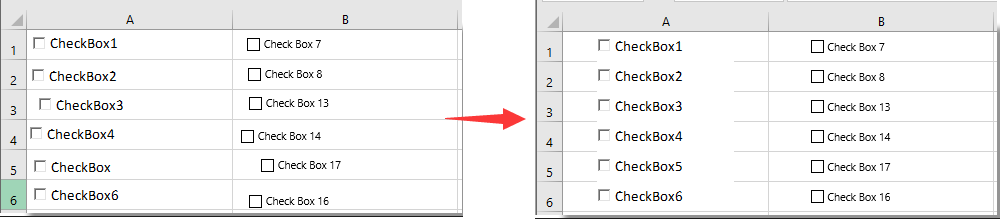
How To Auto-Center Checkbox In Cell In Excel?


How To Auto-Center Checkbox In Cell In Excel?

To automatically center all checkboxes in cells in a current worksheet, please do as follows.
1. In the worksheet, you need to auto-center all checkboxes, press the Alt + F11 keys to open the Microsoft Visual Basic for Applications window.
2. In the Microsoft Visual Basic for Applications window, please click Insert > Module. Then copy and paste VBA code into the code window.
VBA code: Automatically center all checkboxes in cells
Sub CenterCheckbox ()
Dim xRg As Range
Dim chkBox As OLEObject
Dim chkFBox As CheckBox
On Error Resume Next
Application.ScreenUpdating = False
For Each chkBox In ActiveSheet.OLEObjects
If TypeName(chkBox.Object) = "CheckBox" Then
Set xRg = chkBox.TopLeftCell
chkBox.Width = xRg.Width * 2 / 3
chkBox.Height = xRg.Height
chkBox.Left = xRg.Left + (xRg.Width - chkBox.Width) / 2
chkBox.Top = xRg.Top + (xRg.Height - chkBox.Height) / 2
End If
Next
For Each chkFBox In ActiveSheet.CheckBoxes
Set xRg = chkFBox.TopLeftCell
chkFBox.Width = xRg.Width * 2 / 3
chkFBox.Height = xRg.Height
chkFBox.Left = xRg.Left + (xRg.Width - chkFBox.Width) / 2
chkFBox.Top = xRg.Top + (xRg.Height - chkFBox.Height) / 2
Next
Application.ScreenUpdating = True
End Sub
3. Press the F5 key. Then all checkboxes are moved into the center of the cells immediately as below screenshot shown.
Note: This VBA code can be applied to both CheckBox (ActiveX Control) and CheckBox (Form Control).
For more details kindly follow below URL:
Thank you very much for taking the time to reading this topic.